Create Risk Assessmentand Permit to WorkDocuments Faster

Offline, audit-ready maritime safety documentation built for ships, engineers, officers, and safety teams.
Built from real shipboard experience.
Offline Windows App
Risk Assessment
Permit to Work
Activity Editor
Integrity Verification
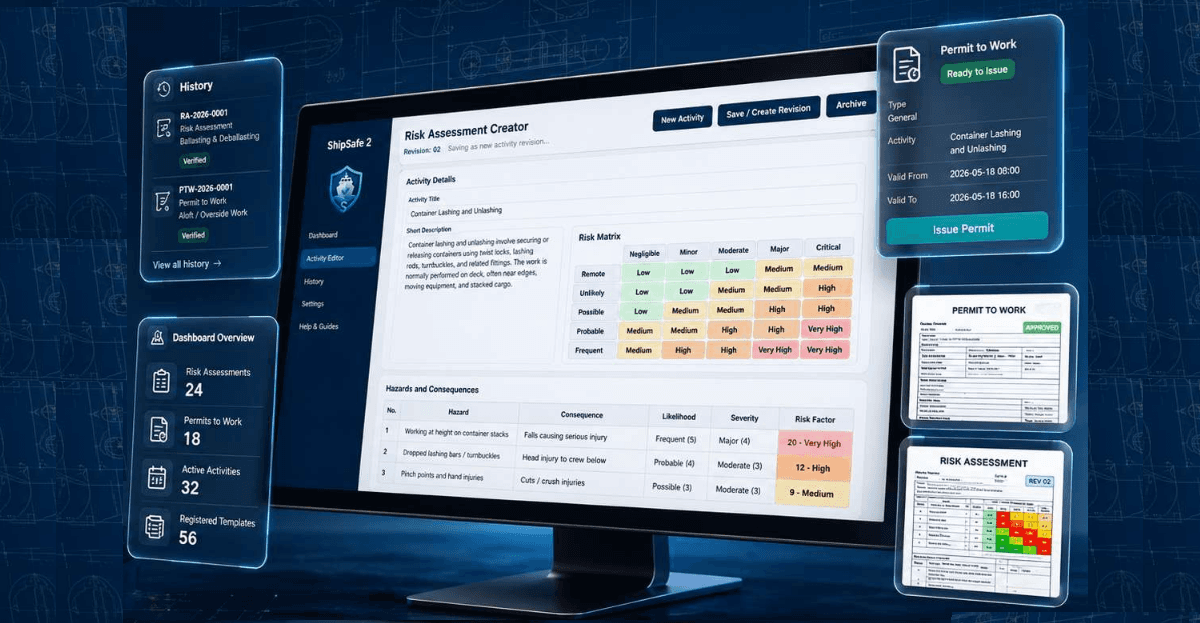
ShipSafe 2 premium product mockup
01
Offline FirstWork anywhere, sync when online
02
Trusted HistoryImmutable records with verified integrity
03
Print & ShareProfessional outputs ready for audit
04
Made for MaritimeBuilt for real operations at sea and in port

Shipboard safety paperwork is still too scattered.

Paper or scattered safety forms slow down onboard work.
Risk Assessment templates can become inconsistent between departments.
Permit documents are often stored without clear traceability.
Audits, vetting, and inspections create pressure for reliable evidence.
Repeated manual document preparation wastes crew time.
Safety routines are difficult to turn into reusable templates.

ShipSafe 2 brings the core safety documentation workflow into one practical desktop app.

Use ShipSafe 2 onboard for Risk Assessment, Permit to Work, editable activity templates, document history, integrity verification, and offline Windows operation. It is designed to keep records consistent without depending on a cloud connection.

Risk Assessment Creator
Create structured Risk Assessment documents from activity templates and job-specific details.
Permit to Work System
Issue professional Permit to Work documents using included shipboard permit types.
Activity Editor
Create and revise activity templates, hazards, consequences, risk ratings, and standard controls.
Document History
Find issued documents, open saved outputs, and review document status from one history view.
Integrity Verification
Verify whether issued output files still match the original integrity record.
Offline Windows Desktop
Run ShipSafe 2 locally on Windows with data stored on the device.
Company Logo / Branding
Available from Vessel Starter upward for vessel and company documentation identity.

ShipSafe 2 Workflow

From reusable activity templates to issued Risk Assessment and Permit to Work documents — with audit-friendly history.

01

Dashboard

Start from a clear operational dashboard with profile summary, document overview, activities, and permit types.

02

Activity Editor — Build Your Own Safety Documentation Framework

ShipSafe 2 includes an Activity Editor for managing shipboard activity templates. Authorized users can create or revise activities, define hazards and consequences, adjust likelihood and severity, and maintain standard control measures. This allows vessels and companies to align Risk Assessment templates with their own operations, safety routines, and SMS expectations. The app is not only a fixed form generator; it helps turn company safety routines into reusable digital templates.

03

Risk Assessment Creation — From Activity Template to Structured RA Document

ShipSafe 2 helps users create a Risk Assessment from a selected activity template. The workflow brings together the activity overview, identified hazards, consequences, likelihood, severity, risk level, standard control measures, and additional comments or controls when needed. The purpose is to support a clearer and more consistent RA documentation process while keeping final review and approval under the vessel or company SMS.

04

Permit to Work Creation — Prepare PTW Records with Clear Safety Checks

ShipSafe 2 supports Permit to Work documentation by guiding users through job details, work location, responsible persons, safety checks, precautions, and authorization fields. The PTW workflow is intended to help organize permit information in a practical format for onboard use. Final permit approval, supervision, and operational control must remain according to the company SMS and vessel procedures.

05

History & Integrity

Track issued documents and verify whether output files remain unchanged or were modified after issue.

06

Settings & Profile

Keep vessel and company profile details ready for consistent document identity and onboard records.

Print-ready document examples

ShipSafe 2 produces clean A4-style outputs for onboard records, audits, vetting preparation, and internal review.

Risk Assessment Output

Compact hazard table, standard controls, risk matrix, initial evaluation, additional controls, and signature area.

Permit to Work Output

Work details, checklist status, validity period, responsible persons, and signature area.

Reusable templates for onboard routines

The Activity Editor keeps reusable shipboard templates close to the Risk Assessment workflow, so repeated operations can start from consistent hazards, controls, and review points.

Built from marine experience

Designed from practical marine engineering and shipboard safety documentation experience.

Built for marine engineers, deck officers, vessel managers, and safety teams.
Focused on practical records that can support real onboard work.
Designed for offline use where connectivity cannot be assumed.

Risk Assessment basics

Visual learning aids for the core safety thinking behind the workflow.

What a Risk Assessment is

A practical review of the task, hazards, consequences, controls, and approvals before work starts.

How risk level is decided

Likelihood and severity combine into an initial risk level, then controls help reduce remaining exposure.

How controls reduce risk

Control measures should be specific, visible, and suitable for the job, location, people, and permit conditions.

Included Permit to Work types

ShipSafe 2 includes common shipboard permit types so crews can start with a consistent Permit to Work framework.

General Permit to Work
Included Permit to Work template.
Hot Work Permit
Included Permit to Work template.
Enclosed Space Entry Permit
Included Permit to Work template.
Aloft / Overside Work Permit
Included Permit to Work template.
Crane / Lifting Permit
Included Permit to Work template.
Electrical Work Permit
Included Permit to Work template.
Line Breaking Permit
Included Permit to Work template.
Bunkering / Fuel Transfer Permit
Included Permit to Work template.
Pressure Testing Permit
Included Permit to Work template.
Cold Work Permit
Included Permit to Work template.

FAQ

Common questions before you download or request a license.

Can ShipSafe 2 work offline?
Yes. ShipSafe 2 is a Windows desktop app designed for offline operation onboard. Internet access is only needed to download the installer and receive a license activation code.
What is the difference between Trial and licensed versions?
Trial outputs are watermarked. Individual and Vessel Starter licenses remove the watermark. Individual keeps profile fields editable but does not include company logo branding. Vessel Starter locks Company Name, Vessel Name, and IMO Number by license and includes company logo branding.
What is Activity Editor?
Activity Editor is the area where authorized users can create or revise activity templates, hazards, consequences, risk ratings, and standard control measures.
Can I customize activity templates?
Yes. ShipSafe 2 lets authorized users maintain activity templates so company routines and onboard safety expectations can be reused in future Risk Assessment documents.
Does ShipSafe 2 include Permit to Work forms?
Yes. ShipSafe 2 includes built-in Permit to Work types for common shipboard tasks, including hot work, enclosed space entry, lifting, electrical work, line breaking, bunkering, pressure testing, cold work, and aloft or overside work.
Where is data stored?
ShipSafe 2 stores app data locally on the Windows device. It is not a cloud app.
What does integrity verification mean?
When a document is issued, ShipSafe 2 records an integrity hash. History can later show whether the saved output still matches the original record.
Can I add a company logo?
Company logo branding is available from Vessel Starter upward. Trial and Individual do not include company logo branding.
Is ShipSafe 2 a cloud app?
No. ShipSafe 2 is an offline Windows desktop application.